Thai Numeral Converter
A Microsoft Word add-in that permanently converts Arabic numerals to real Unicode Thai numerals in official documents — replacing a font trick that doesn't work on Mac and quietly corrupts documents when it doesn't.
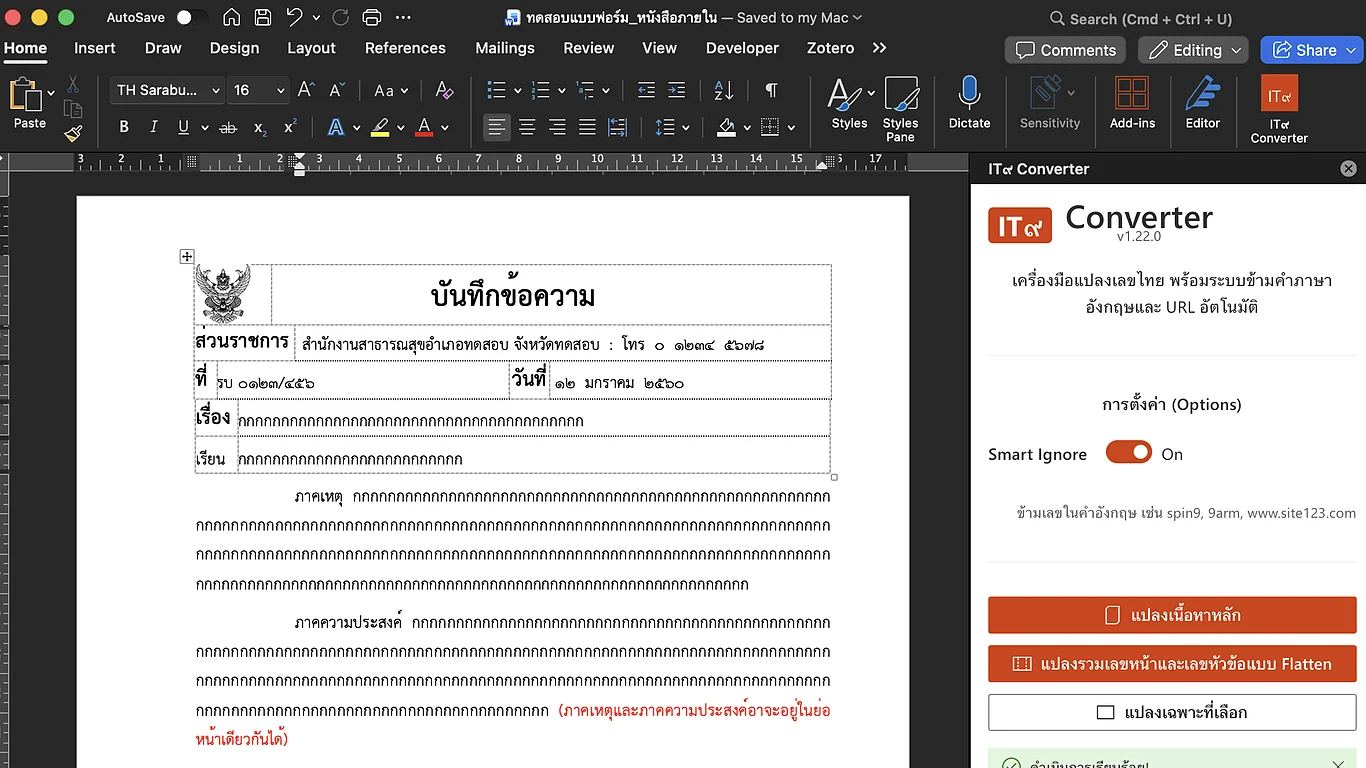
Thai official documents must use Thai numerals, but many templates rely on a font called "TH Sarabun IT๙" — a Sarabun variant where Thai-numeral glyphs are simply mapped onto the ordinary digit keys, so typing "1" displays "๑" without any real underlying change to the text. That font doesn't install or render on Mac, and even on Windows, staff switch inconsistently between plain "TH Sarabun New" and "TH Sarabun IT๙" while editing the same file — so one document ends up with some digits as real Thai numerals and others as plain Arabic numerals wearing a font trick, mixed within the same word or field.
Rather than another font hack, the add-in performs a real, permanent Unicode substitution directly inside the live Word document, editing text in place so bold, italic, and color formatting all survive the conversion. A "Smart Ignore" mode is on by default: digit runs touching a Latin letter — email addresses, URLs, anything glued to English text — are skipped, while free-standing numerals elsewhere convert normally. It also recognizes English-format dates and rewrites them as the Thai month name with a Buddhist-Era year.
A "Deep Search & Flatten" mode extends conversion into headers, footers, page-number fields, and auto-numbered lists, permanently flattening them into Thai-numeral text — the same job an earlier VBA macro handled before this became a proper Word add-in.
A working add-in, sideloaded via a downloadable manifest with separate install paths documented for Mac and Windows — itself a workaround for the original Mac font-install failure that started the whole project.