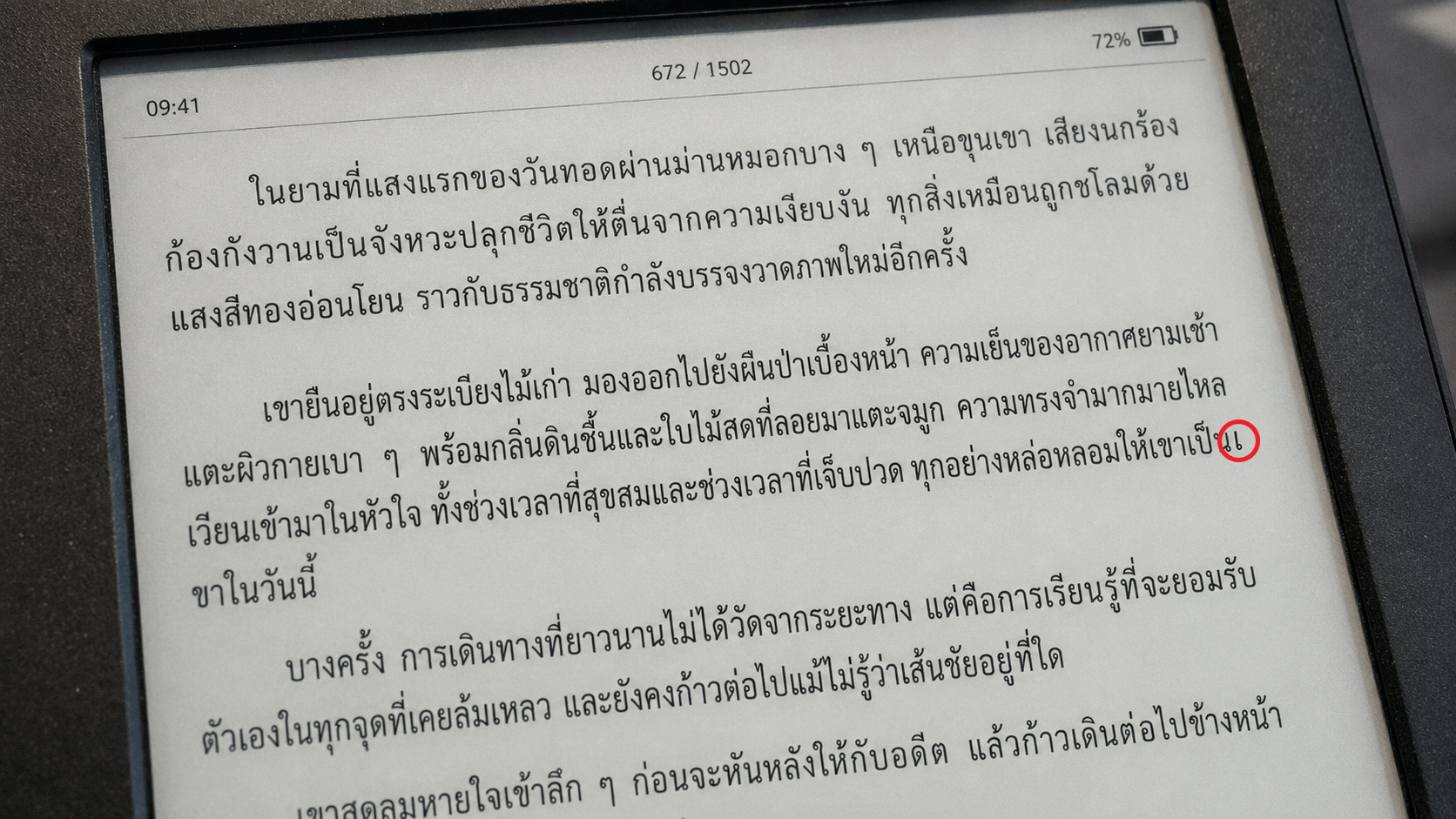
Why Thai Text on the Web or E-Readers Splits Characters Wrong
The first post on this blog was written in Thai, until someone messaged me that “reading on mobile, the text is broken.” That’s how I found out my own site had a Thai word-breaking problem I’d never noticed before. This post is a record of the whole fix: from where I got it wrong at first, to the real answer, and what I learned along the way turned out to be a much bigger deal than I expected. Including the fact that multiple Thai word tokenizers don’t even agree with each other on what a “word” is, all the way to how other languages using an Abugida (a script where each consonant carries its own attached vowel) combined with Scriptio Continua (a writing system with no spaces between words), such as Lao, Khmer, Burmese, and Tibetan, solve this same problem.
(สามารถอ่านบทความนี้เป็นภาษาไทยได้โดยการคลิกที่ปุ่มลูกโลกที่มุมบนของบทความ)
The symptom: a character that “goes missing” mid-word
A reader sent two screenshots: one from the LINE in-app browser on a phone, one exported as a PDF from mobile Safari. Both showed the opening paragraph of an article, and the word “เตรียม” (prepare) was split mid-word, leaving a single stranded character “เ” at the end of one line, with the rest, “ตรียม”, wrapping to the next.
The bug report
Both screenshots came from a phone, not a simulation. And critically: opening the same page in Chrome on my own laptop showed no problem at all. The text wrapped perfectly normally.
That gap, same page, same content, completely different rendering across machines, is where the whole investigation started.
Wrong hypothesis #1
“WebKit doesn’t support Thai word segmentation”
The tempting first explanation: Safari/WebKit (which LINE’s iOS browser also runs on, via WKWebView) must lack the dictionary-based Thai word segmentation that Chrome has, since Chrome bundles ICU (International Components for Unicode) with full Thai dictionary support built in.
That hypothesis died fast. I loaded BBC Thai in real WebKit (via Playwright, not a guess) and found BBC’s Thai text wraps perfectly, and BBC sets no special Thai CSS at all.
So I ran a controlled test: one blank HTML page, the same Thai paragraph repeated five times, each copy with a different word-break/overflow-wrap combination, all rendered by the same WebKit engine side by side:
| CSS used | Result in WebKit |
|---|---|
| No override at all (browser default) | Wraps correctly |
overflow-wrap: break-word alone |
Wraps correctly |
word-break: break-word (legacy) |
Wraps correctly |
word-break: normal; overflow-wrap: normal; |
Wraps correctly |
word-break: keep-all + overflow-wrap: break-word (what my site had at the time) |
Breaks mid-word |
The real cause
It’s a bug I shipped myself.
The site’s own CSS had a comment reading /* Thai typography adjustments for spacing and word-breaking */, meaning this was a past attempt to fix Thai typography that had actually made things worse than the browser’s own default.
/* before */
.markdown-body[lang="th"] {
  line-height: 1.8;
  word-break: keep-all;
  overflow-wrap: break-word;
}
word-break: keep-all is designed primarily for CJK (Chinese/Japanese/Korean) text, meaning “don’t break inside a run of CJK characters.” Applied to Thai in WebKit, it left WebKit with no valid break opportunity anywhere in the unspaced Thai text (because keep-all disabled the normal word-boundary lookup), so it fell back to overflow-wrap: break-word, a last-resort mechanism that just breaks wherever a line would otherwise overflow. The result: mid-syllable breaks at effectively random points, exactly what the screenshots showed.
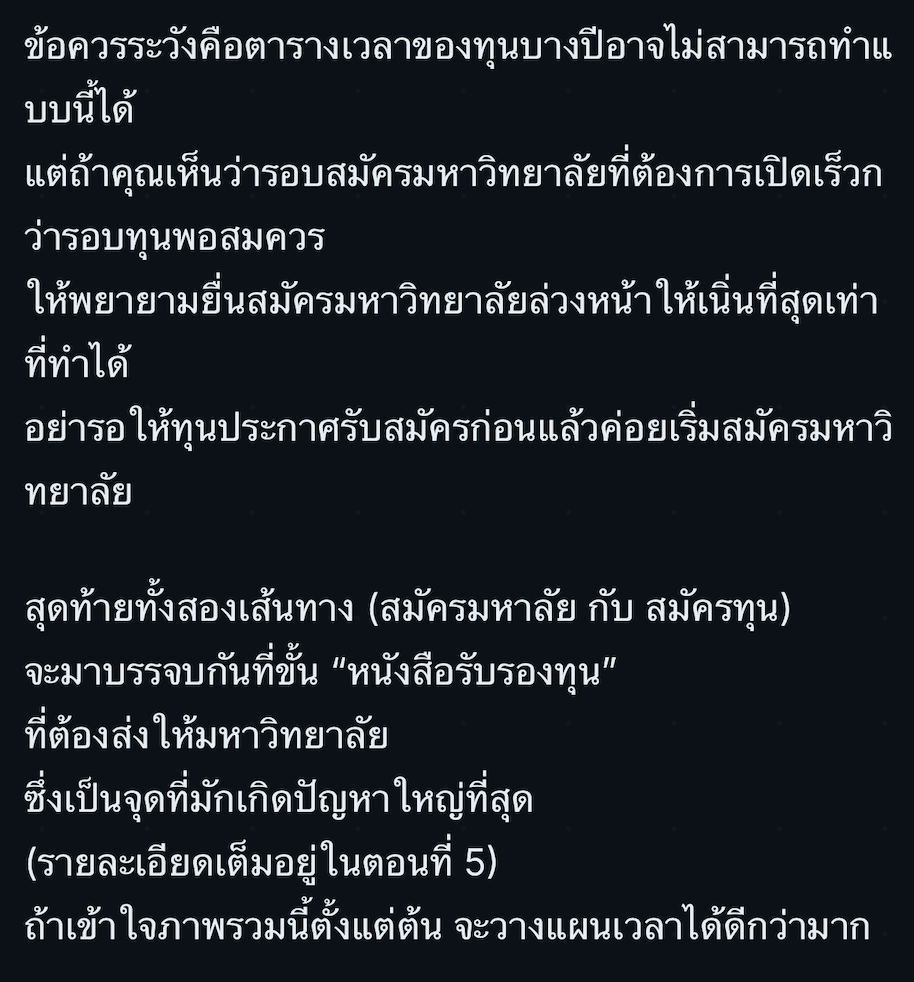 A real example from another post on this site, before the fix.
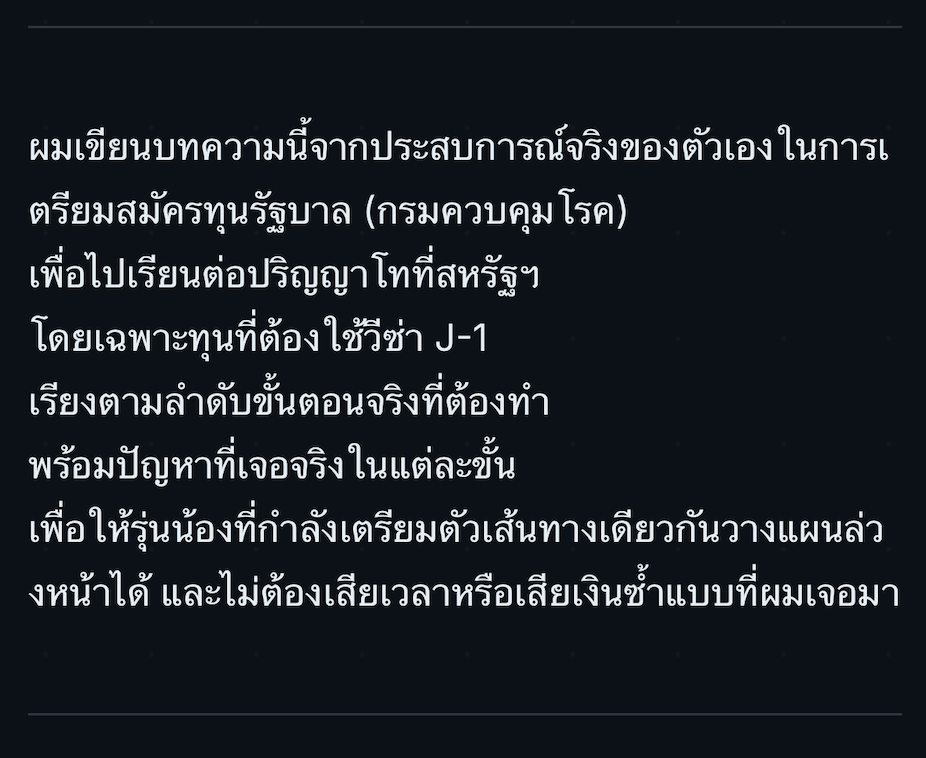 The opening paragraph of the same post. Words break mid-word starting from the first line.
The fix is one deleted line:
  .markdown-body[lang="th"] {
    line-height: 1.8;
-   word-break: keep-all;
    overflow-wrap: break-word;
  }
Verified again in real WebKit: the word that used to split (เตรียม → เ + ตรียม) is now one intact word, and Chrome still renders correctly with no regression.
But what’s left: real words the browser’s own dictionary still splits wrong
Fixing the CSS handled most of it, but not all of it. Running the analysis on a real 35,436-character article (a 38-minute read), I found that out of 934 unique words, 70 are still split at the wrong position by the browser’s native segmenter (Intl.Segmenter). Some of the most common examples in a scholarship/visa-guide-style article:
- ตัวเอง (oneself), an extremely common pronoun, split into ตัว + เอง
- ขั้นตอน (process/step), used in nearly every section, split into ขั้น + ตอน
- เจ้าหน้าที่, สถานทูต, พาสปอร์ต, ต้นสังกัด, เร่งด่วน, ใบเสร็จ, สถานกงสุล, words that repeat constantly throughout the article, adding up to 253 mis-split occurrences.
That made me change the question from “fix the CSS and you’re done” to “now I need a systematic way to find every word the browser’s dictionary gets wrong.”
Shopping for “ground truth” from Thai word tokenizers
The plan: find a more accurate tokenizer, use it as ground truth, and diff its output against Intl.Segmenter to find every mismatch. I tried several:
| Tokenizer | Approach | Browser-portable? | Dictionary size | Speed (same article) |
|---|---|---|---|---|
Intl.Segmenter (built-in) |
ICU dictionary | Yes, free, ships with every browser | 0 | ~11-13ms |
wordcut |
Lexitron/NECTEC dictionary | No, uses Node’s fs/glob directly |
105KB (gzip) | ~61-76ms |
nlpo3-newmm-typescript |
Same NewMM algorithm as PyThaiNLP, rewritten in pure TypeScript | Yes, zero dependencies | 314KB (gzip) | ~12-13ms (~5x faster than wordcut) |
PyThaiNLP itself (attacut/deepcut) |
Deep learning (CNN) | No, Python + PyTorch/TensorFlow only | - | - |
| ICU compiled to WASM | Entire ICU library | Technically yes, but… | 12.8MB (gzip) | ruled out immediately |
wordcut has a real bug: it corrupts “สหรัฐฯ” (an abbreviation of “United States”) every time it encounters the abbreviation mark ฯ. nlpo3-newmm-typescript handles that case correctly and is faster, but with a caveat: its own README states “Project VibeCode use deepseek 4 Pro”: it’s AI-generated code, one maintainer, published only 4 weeks before this investigation, with no track record yet.
Along the way
Benchmarking wordcut fully (not just its dictionary) showed init (loading the dictionary + building a prefix tree) took ~88ms, and ~71ms of that was pure CPU time, not disk I/O. So even if the dictionary shipped pre-bundled (no network fetch), that cost doesn’t go away. Add ~61-76ms to actually segment the article, and on a real mid-range phone (typically 2-4x slower than a dev machine), that’s plausibly 300-500ms of main-thread blocking, a delay you’d actually feel.
The twist nobody expected: swap the ground truth, get a 6x different answer
I re-ran the mismatch analysis using nlpo3-newmm-typescript as ground truth instead of wordcut, expecting similar or better results. Instead I got 431 “mismatches” instead of 70, 6x more.
Looking at the actual list explains why: words like เพื่อให้ (“in order to”), ไม่ต้อง (“don’t need to”), and อยู่แล้ว (“already”) were registered as single tokens by this tokenizer’s dictionary, but they’re just two ordinary words placed next to each other, the same way an English reader wouldn’t blink if “in order to” wrapped mid-phrase across a line. This isn’t the same class of problem as “ตัวเอง” splitting, which looks genuinely wrong because it’s a tightly bound unit readers process as one piece.
The most important finding in this whole post
Different Thai tokenizers aren’t just “more or less accurate” versions of each other; they define “word” differently from the start, because Thai script carries no boundary marks at all. There’s no binary right answer here. A tool built for NLP tasks (search indexing, POS tagging) will deliberately lump frequent word pairs into single tokens, a completely different goal from “does this look wrong if it wraps here.” Using ground truth from the wrong kind of tool can make the actual problem worse, not better.
So what do actual e-readers do about this?
Next question: has anyone already solved this well? I looked at how real e-reader software, not just browsers, handles it. Short answer: no one has yet. Here’s what I found:
KOReader (open-source e-reader software that actually runs on jailbroken Kindle/Kobo hardware) hits the identical mid-word-break bug: there’s an open issue #11701 reporting it directly. The cause: KOReader uses libunibreak, a lightweight library with no Southeast Asian dictionary data at all. The maintainers discussed four fixes (switch to full ICU4C, integrate the smaller libthai, manually insert zero-width spaces, or add neural-net capability to libunibreak), and closed the issue as “not planned.” The reason: bundling full ICU would meaningfully bloat the app for a device meant to stay lightweight, exactly the size-vs-quality tradeoff I hit myself testing ICU-via-WASM (12.8MB).
Amazon’s own Kindle firmware is arguably worse. User reports describe Thai tone marks becoming displaced from vowels, or dropping entirely, on Kindle Paperwhite, a more basic rendering defect than word-wrapping, one level below where our bug even lives.
Even the best-performing engine in our own tests still has a documented, unfixed Thai bug. W3C’s own Thai Gap Analysis names Gecko, Blink, and WebKit as all failing “Maiyamok wrapping”: the rule that ๆ (U+0E46, the Thai repetition mark) must never start a line, since it’s meaningless without the word before it. Nobody has fixed this yet, in any engine.
What about other languages that write without spaces too?
Widening the search: Thai isn’t the only script written without spaces between words (scriptio continua), and, this was the most interesting part, not every such script has the same problem.
The group that has our exact problem: Lao, Khmer, Burmese. These are all abugidas (a consonant carries an inherent vowel, modified by attached marks) and written without spaces, the same combination that makes Thai hard, because splitting mid-cluster produces something genuinely unreadable, unlike splitting between two independently legible Chinese characters. What’s striking is that this isn’t just poorly implemented for these languages, it’s not even fully specified yet. The open W3C issues for Khmer and Lao are literally still asking whether breaking at any syllable boundary is acceptable, or whether only true word boundaries are; there’s no confirmed answer yet.
Burmese has a worse, earlier-generation crisis layered on top. Before word segmentation was even the concern, Myanmar had to choose between the Zawgyi and Unicode encodings: two incompatible encodings sharing the same Unicode code points (U+1000–U+109F), so the same bytes render as legible Burmese with one font and different, incorrect characters with another. Thai’s problem looks tame by comparison.
The most surprising finding: Tibetan solved this at the script level, not the software level, centuries ago. Tibetan writing includes a dedicated punctuation mark, tsheg (་, U+0F0B), that writers insert after every syllable as a completely normal part of writing the script, not a retrofit. Software can break a line after any tsheg with zero dictionary and zero NLP, because the script itself marks every legal break point. Even better: Unicode provides a second, near-identical character, U+0F0C, “non-breaking tsheg”, for the rare cases where a normal tsheg’s default breakability needs to be suppressed. That’s structurally identical to the ZWSP-vs-WORD-JOINER distinction I tried for Thai. Tibetan just built it into the writing system from the start, long before anyone needed a computer to render it.
Chinese and Japanese sidestep the whole problem, because they never needed word boundaries for line-breaking at all. Japanese line-breaking (kinsoku shori, 禁則処理, standardized as JIS X 4051) operates purely on character class: don’t start a line with closing punctuation, don’t end one with opening punctuation, keep certain pairs together, no dictionary required, because every CJK character is independently legible on its own. Breaking between almost any two of them never produces garbage, unlike splitting a Thai consonant from its own vowel sign. This is why CJK line-breaking has been a solved, boring problem for decades while Thai’s stayed open: it only looks like “the same kind of hard” as Thai’s problem; it’s actually a different problem in kind, not just degree.
What this site actually ships now
- Deleted
word-break: keep-allfrom the CSS, handling almost all of the problem, at zero cost. This is the one change actually applied to every page here, including the one you’re reading right now. - A 70-word list of words the browser still gets wrong, kept in
src/data/thai-word-joins.json, generated usingnlpo3-newmm-typescriptas the candidate source (faster thanwordcut, no สหรัฐฯ bug), diffed againstIntl.Segmenter, and hand-filtered every time, dropping ordinary phrases like “เพื่อให้” and keeping only genuinely atomic units like “ตัวเอง”. It’s used by the interactive demo below, not applied to this site’s own pages. - A postbuild script that can apply that list to real content:
scripts/apply-thai-word-joins.mjswraps each listed word (plus every Maiyamok ๆ) in awhite-space:nowrapspan directly in already-built HTML, automatically skipping code, links, and headings (so anchor IDs stay intact). It exists and works: running it for real against this article’s own build produces exactly the number I’d estimated earlier, 253 spots it would fix, but it’s deliberately not wired into this site’s ownnpm run build. It’s demonstrated live in the widget below, not deployed on this article’s own text. - No tokenizer or dictionary ever ships to a reader:
nlpo3-newmm-typescriptandcheeriolive indevDependenciesonly, and the tokenizer is only ever lazy-loaded client-side if you click the 4th demo tab below. What readers otherwise get is still plain static HTML, not a single extra byte of runtime weight. - A dev script for auditing new Thai posts:
npm run thai:auditscans freshly built content for new candidate words for the list above (never auto-merging them, for the reason explained above; running it against this very article surfaced 346 new candidates, most of which were ordinary phrases that shouldn’t be added).
What we deliberately chose not to do matters just as much: no full tokenizer engine shipped to the browser (too expensive for what it buys), no full text-justification built on the same tokenizer (no evidence yet that it would actually improve readability, and real risk that it wouldn’t), no auto-merging new candidates into the list without a human looking at them first.
Try it yourself
Below is a live, interactive demo. Type your own text in place of the sample, then switch tabs to see the same text at each stage of the fix. The sample paragraph translates roughly to: “The embassy officer said I had to prepare my passport and receipts through every step before the appointment at the consulate, because it was urgent and I had to handle it all myself, no one else could help. Many people with the same problem say you have to read every single line of the details carefully, and check the documents over and over before submitting, because even a small mistake could mean starting the whole process over again, otherwise you might miss the travel date on a flight already booked in advance, and have to pay extra to change it at the last minute.” It’s deliberately packed with real curated-list words (เจ้าหน้าที่, สถานทูต, พาสปอร์ต, ใบเสร็จ, ขั้นตอน, สถานกงสุล, เร่งด่วน, ตัวเอง, เตรียม, ตรวจสอบ, รายละเอียด, ผิดพลาด) plus several Maiyamok (ๆ) repetition marks, so the effect is visible across a realistic amount of text, not one isolated word.
The first 3 tabs (simulated / browser default / with word-joiner) load no tokenizer or dictionary at all. The “with word-joiner” tab runs the exact same logic as scripts/apply-thai-word-joins.mjs, reading the same src/data/thai-word-joins.json file, but that script isn’t run against this site’s own pages, so this tab is a demonstration of the mechanism, not a preview of what you’re already reading. The 4th tab (“full nlpo3-newmm-typescript”) lazy-loads the real ~314KB dictionary only when you actually click it, not on page load, and none of this loads at all on any other post that doesn’t embed this demo.
References
- Thai Layout Requirements (W3C, 2024)
- Thai Gap Analysis (W3C)
- Approaches to line breaking (W3C Internationalization)
- Khmer line-breaking: open issue (W3C sealreq)
- Lao line-breaking: open issue (W3C sealreq)
- KOReader issue #11701: Thai language word break doesn’t work
- Tibetan formatting rules: Digital Tibetan
- Requirements for Tibetan Text Layout and Typography (W3C, 2024)
- Line breaking rules in East Asian languages (kinsoku shori)
- wordcut (npm)
- nlpo3-newmm-typescript (npm)
- nlpO3 by PyThaiNLP